

Parcels
If your building tracks parcels, you can view the parcels delivered to you through the AppNFlat platform. When a parcel arrives for you, building staff register it in the system, and you’ll be notified that you have a parcel to pick up.
Receiving Notifications
When a parcel arrives for you, building staff register it in AppNFlat. You will automatically receive an email notification informing you that:
- A parcel has arrived for you
- The type of parcel (perishable or non-perishable)
- The carrier (if known)
Indicating Your Pickup Time
From the notification email, you can indicate when you plan to pick up your parcel:
- Today: You will come today
- Tomorrow: You will come tomorrow
- Later: You will come later this week
This information helps the building staff manage parcel storage and follow up with residents.
Automatic Reminders
If you haven’t picked up your parcel, you may receive automatic reminder emails. These reminders help ensure you don’t forget about your delivery, especially for perishable items that need to be collected quickly.
Viewing Your Parcels
To see parcels delivered to you:
- Click on Services in the left navigation menu, then on Parcels
- View the list of parcels addressed to you
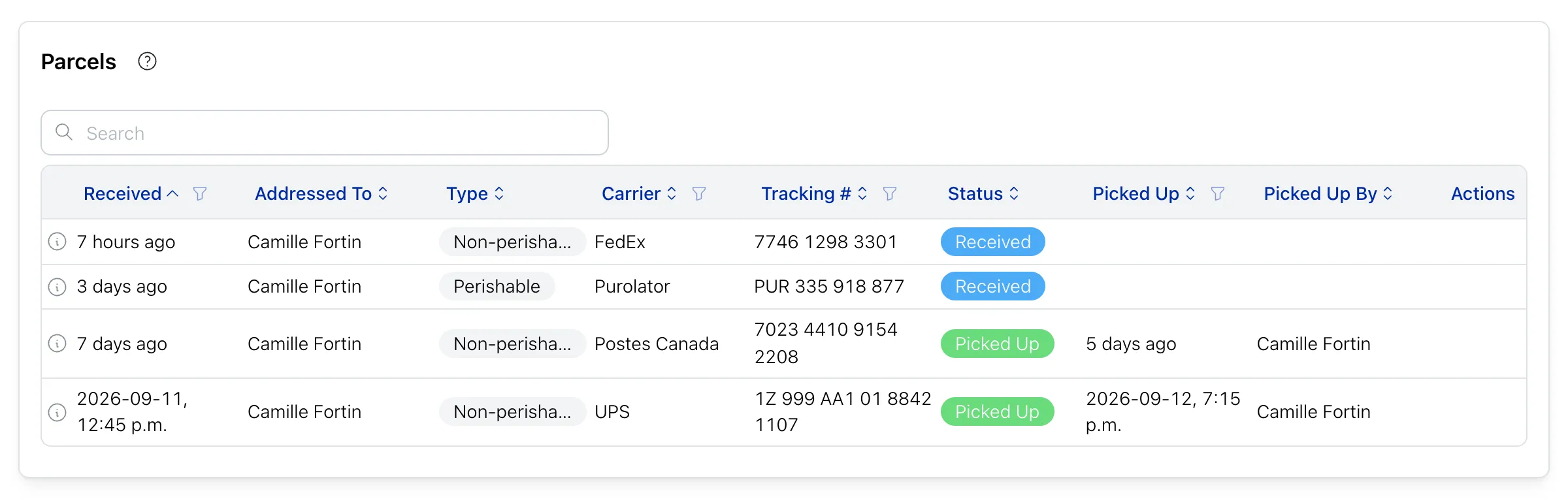
You’ll see information about:
- Parcels currently waiting for pickup
- Parcels you’ve already picked up
- Parcel delivery date
- Who the parcel is addressed to
- Any notes about the parcel
Parcel Information
For each parcel, you can view:
| Received | Date the parcel was registered |
| Addressed To | Resident the parcel is addressed to |
| Type | Perishable / Non-perishable |
| Carrier | Name of the parcel carrier |
| Tracking # | Parcel tracking number |
| Status |
|
| Picked Up | Date the parcel was picked up |
| Picked Up By | Name of the person who picked up the parcel |
Adding Comments
You can add comments to the parcels addressed to you. This is useful for communicating with building staff about the parcel.
To add a comment:
- Find your parcel in the list
- Open it to reach the Comments section
- Add your comment
- Save
Privacy and Security
Parcel information is private:
- You can only see parcels addressed to you, or that you picked up yourself
- Other residents cannot see your parcel information
- Building staff can see parcel information to manage deliveries